Podia Pricing and Review (2026): Mover vs Shaker, the 5% Fee, and Is It Worth It?
Podia’s 2026 plans, the 5% Mover fee, and what each plan really costs at $1,000, $5,000 and $20,000 a month in sales.


Podia markets itself as an affordable way for learning businesses to run their website, courses, coaching programs, digital products and blog on one platform.
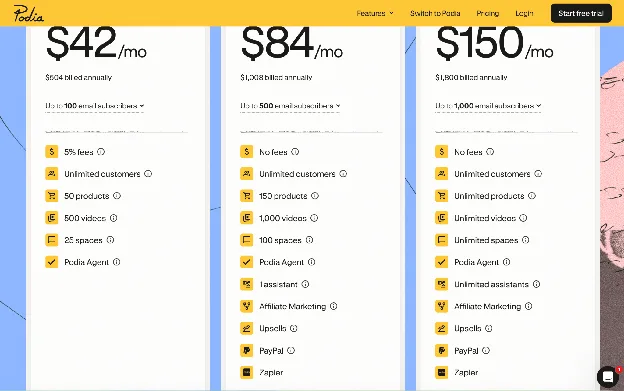
Plans start at $49 a month for Mover, $99 for Shaker and $179 for Earthquaker, or $42, $84 and $150 a month billed yearly. Mover adds a 5% fee to every sale; Shaker and Earthquaker don't. All three include the essentials, but differ on usage limits, marketing tools, payment options and automations.
You can test Podia’s features during a free 14-day trial, including core marketing tools not available on Mover, like upsells and affiliates. No credit card is required.
Below, we cover what each plan includes, the costs that show up later, and what each plan actually costs at three revenue levels.
Podia pricing at a glance
Podia offers three plans, Mover, Shaker, and Earthquaker. If paid monthly, the costs are $49, $99, and $179. When paid annually, pricing drops to $42, $84, and $150 a month, but you pay the full year upfront.
Shaker adds some important features for building your brand. You can sell 150 products vs. 50 on Mover, set up affiliate marketing relationships, add up to 500 free email subscribers, increase video uploads, and offer students the convenience of paying with PayPal as well as Stripe.
Other enhanced features on Shaker include upsells, and more community building opportunities. Shaker gives you 100 spaces, as compared to 25 on Mover. Because spaces can be restricted to certain students for a price, they’re another source of revenue.
| Price/Feature | Mover | Shaker | Earthquaker |
|---|---|---|---|
| Monthly price | $49/month | $99/month | $179/month |
| Annual price (paid in full upfront) | $504/year ($42/month) | $1,008/year ($84/month) | $1,800/year ($150/month) |
| Products | 50 | 150 | Unlimited |
| Email subscribers | 100 (pay to add more) | 500 (pay to add more) | 1,000 (pay to add more) |
| Videos | 500 | 1,000 | Unlimited |
| Community spaces | 25 | 100 | Unlimited |
| Affiliate marketing | No | Yes | Yes |
| Upsells | No | Yes | Yes |
| Zapier integration | No | Yes | Yes |
| Podia transaction fee | 5% | 0% | 0% |
| Payment options | Stripe | Stripe and PayPal | Stripe and PayPal |
Podia supports digital wallets like Apple Pay and Google Pay, and buy now, pay later (BNPL) options from Affirm, Klarna and Afterpay through Stripe. BNPL isn't available on PayPal checkouts.
What Podia actually costs at three revenue levels
We’ve calculated your total cost for Mover, Shaker, and Earthquaker for 3 different revenue levels so you can compare what you’ll actually pay for each plan as your customers and sales grow. Processing fees and Podia transaction fees are estimated using an average price of $100 for each product you sell.
As you can see, while Mover is the cheapest plan based on subscription cost alone, you pay a 5% transaction fee on every sale. That increases Podia’s fees for Mover and makes it more expensive than Shaker once you pass $840 in monthly sales with annual billing. With monthly billing, the break-even point is $1,000. At $5,000 in sales even Earthquaker is cheaper than Mover, and it comes with substantially more features.
| Monthly sales | Mover | Shaker | Earthquaker |
|---|---|---|---|
| $1,000 (monthly billing) | $131 $49 plan + $32 processing + $50 Podia fee | $131 $99 plan + $32 processing | $211 $179 plan + $32 processing |
| $1,000 (yearly billing) | $124 $42 plan + $32 processing + $50 Podia fee | $116 $84 plan + $32 processing | $182 $150 plan + $32 processing |
| $5,000 (monthly billing) | $459 $49 plan + $160 processing + $250 Podia fee | $259 $99 plan + $160 processing | $339 $179 plan + $160 processing |
| $5,000 (yearly billing) | $452 $42 plan + $160 processing + $250 Podia fee | $244 $84 plan + $160 processing | $310 $150 plan + $160 processing |
| $20,000 (monthly billing) | $1,689 $49 plan + $640 processing + $1,000 Podia fee | $739 $99 plan + $640 processing | $819 $179 plan + $640 processing |
| $20,000 (yearly billing) | $1,682 $42 plan + $640 processing + $1,000 Podia fee | $724 $84 plan + $640 processing | $790 $150 plan + $640 processing |
Processing payments for international cards, direct bank transfers, ACH payments, and buy now pay later (BNPL) options (not supported by PayPal) vary from the standard 2.9% + 30¢ processing fee for each transaction.
Stripe charges the standard 2.9% + 30¢ processing fee for digital wallets, but 4.4% + 30¢ to process international cards and an additional 1% for currency conversion.
These totals leave out email add-ons. A Mover creator with 1,000 subscribers on their list pays another $18 a month on monthly billing, or $14 a month billed yearly.
Hidden costs and add-ons
Podia's plan price doesn’t include all the costs of running your business because the plans don’t come with all the features you need. Usage caps for email subscribers and third-party integrations you add to supplement Podia’s tools increase your monthly expenses.
When considering whether Podia Mover vs Shaker is the best plan for your business consider the hidden costs and add-ons. Mover includes 100 email subscribers, Shaker includes 500. As your list grows, you have to pay a set monthly fee. On Mover, billed yearly, it’s $8 a month for 500 subscribers and $14 for 1,000. Paid monthly, it’s $10 and $18.
On every plan, 2,500 subscribers costs $22 a month and 5,000 costs $36 a month if you pay yearly, or $28 and $45 if you pay monthly. Since Earthquaker comes with 1,000 free subscribers, fees kick in at the 2,500 tier.
In addition to the 5% transaction fee on Mover, payment processing fees are higher if you offer BNPL options with Stripe or accept international cards with Stripe or PayPal.
To supplement Podia’s basic business and marketing tools, you’ll have to pay a monthly plan fee for any third-party tools you add. Shaker and Earthquaker plans come with the option to integrate Zapier to automate workflows and connect more than 5,000 third-party apps to optimize operations.
Zapier has a free plan that includes 100 tasks per month. Once you outgrow it, paid plans start at $19.99 a month. You’ll also have to pay a fee for any apps you integrate using Zapier.
Podia also leaves some administrative work up to you. Podia doesn't remit sales taxes or VAT, and it doesn’t automate payments to your affiliate marketers, which either adds to the time you must invest or the cost of running your business.
What you get for the money
Podia bundles a website builder, learning products, a blog, and sales tools in three affordably priced plans. It’s easy to use, especially if you don’t have technical skills. With the rich text editor, you can format text and add clickable buttons, images, media and files to your content, or embed links as easily as you would in Google Docs or Microsoft Word.
For the price, the Mover and Shaker plans come with a fair set of features. Mover allows you to sell 50 products, including courses, coaching services, memberships, and digital downloads, which gives you several ways to profit from your expertise. Step up to Shaker and the product cap rises to 150.
You can also enroll unlimited students and community members, and sell digital downloads to as many customers as choose to buy, on both Mover and Shaker. To grow your business, plans include basic email marketing and tax calculation tools, though subscriber numbers are capped at 100 on Mover and 500 on Shaker. While Podia calculates taxes and adds them to the product price at checkout, it’s up to you to pay the appropriate authority.
Where it falls short
While many users praise Podia for its value and ease of use, it also lacks several features that other course platforms include.
Unlike a true drag-and-drop builder, the rich text editor makes it harder to personalize your content and build a unique brand identity.
“I wish the websites were a little more customizable (although I really love what I've built),” Maddi A. explained in her July 23, 2025 review.
It’s also easy to hit the email caps (100 on Mover and 500 on Shaker) as your business scales and your audience grows. You have to pay monthly Podia fees to add more subscribers, which adds to your costs.
Perhaps the most surprising downside I found is that Podia doesn’t have a mobile app, a popular way to learn on the go. Students have to log into your Podia account using a mobile browser to access a course, join a community, comment, or make a purchase.
Who Podia is for and who should skip it
Podia is particularly well suited to solopreneurs and small businesses that plan to sell a few courses or coaching services, and don’t mind handling management tasks, like affiliate payouts and tax remittance on their own.
Businesses interested in building a recognizable brand experience on their website, blog and learning products may want to explore other platforms. Podia designed its software to be simple and approachable, even for those without any technical know-how, but the lack of complexity comes with a tradeoff. Advanced design capabilities and functionality are more limited.
Is Podia worth it in 2026?
If you prize ease of use, want an integrated platform for your website and learning products, and are willing to give up advanced design, payment, sales, and marketing tools, Podia is worth it.
If you want true drag-and-drop website building, mobile apps for your students, or advanced tools to run every part of your business, the answer is no. Other course platforms will suit you better.
The harder question for many learning businesses isn’t whether Podia is worth it, but which plan to choose: Mover or Shaker.
If you’re moving from another learning platform and have an established clientele and revenue stream, Shaker will likely be cheaper, taking Mover’s 5% transaction fee into account. It also comes with more built-in features for managing your business.
Mover is the better choice if you’re looking to launch and build a new business. You can sign up for a monthly plan and, when your sales grow and your ongoing monthly revenue averages $1,000, re-evaluate the benefits of an upgrade to Shaker to eliminate the transaction fee and benefit from its enhanced features.

How Heartbeat compares
Heartbeat is built around the community: members talk to each other in channels, meet at live events and take courses together, with memberships, cohort courses and checkout in the same place. Podia, by contrast, is built around a storefront, and community spaces are secondary.
Heartbeat is the better fit when the community is what people pay for, like a membership, a group program or a cohort course. Members get a mobile app, which Podia doesn’t offer, and on the Scale plan you can launch your own branded app in the App Store and Google Play. Heartbeat subscribers at every tier get unlimited courses, events, documents, and more. And Heartbeat offers a 14-day free trial, with no card required to start, so you have time to try it with real members.
Frequently asked questions
How much does Podia cost?
Your total cost includes your subscription, processing costs, integrations, and platform fees for transaction fees on Mover or additional email subscribers. Estimate processing costs based on the average price of the products you sell, and add the monthly plan price for third-party integrations you add, such as Zapier, Mailchimp, or a CRM like HubSpot.
What is better than Podia?
Kajabi offers a broader set of built-in tools for learning businesses that plan to grow. While plan prices are more expensive, Kajabi doesn’t add a transaction fee on its entry plan, and builds in a full suite of business and marketing tools. Its broader template selection and builder offer advanced customization for crafting a single, recognizable brand.
Which is better, Podia or Thinkific?
This depends on your goals for your learning business. Podia is a good fit if you want one simple platform for your website, blog, email marketing, and learning products. Thinkific is worth considering if course delivery, student learning features like a mobile app, and business and tax management matter more than having your website and marketing tools in one place.
What are the key differences between Podia and Teachable?
Podia and Teachable serve different priorities and business models. Podia is for creators who want their website, store and products in one place, Teachable for individual educators or businesses that want to keep their website and blog separate from the products they offer. Another key difference is that Teachable has native mobile apps for students, its own payment processor, and built-in tax management tools.
How much does Podia charge in transaction fees?
Podia adds a 5% transaction fee to every payment you process on its entry-level Mover plan. On $5,000 in monthly sales, the transaction fee is $250. It’s why you may want to upgrade to Shaker when your sales total more than $840 per month with annual billing, or $1,000 with monthly billing. At those revenue levels, Shaker is cheaper than Mover and offers more advanced features.
Sources
Every price, fee and limit on this page and where it came from. Last checked .