Best Membership Site Platforms (2026)
We reviewed ten popular membership site platforms and catalogued their features, fees, quirks, and suitability for growing communities.


Want to charge people every month for your content? Then you'll need a membership website builder, and picking the right one is the hard part.
Some builders charge a flat monthly price, while others take a cut of every sale. A few do both, and once members start paying, that cut adds up faster than most people expect.
So we did the math for you. Before getting to the platforms, we'll look at the three main ways people set up a membership site. After that comes the part most reviews skip: what each of the ten actually costs you at $1,000, $5,000 and $20,000 a month in member payments. (We checked every price ourselves in October 2026.)
We wrote this for creators and coaches, the folks selling courses, communities and content. If you run a club or a nonprofit, a different kind of tool will probably suit you better.
The short list
Here are the best membership site platforms side by side. Prices are the lowest monthly rate on annual billing, and the fee column shows what the platform takes from each sale before card processing.
| Platform | Type | Starting price | Platform fee | Best for | Courses | Community | Branded app |
|---|---|---|---|---|---|---|---|
| Heartbeat | Hosted | Build: $40/mo | 5% on Build, 2.5% on Grow, 1.25% on Scale | Paid communities where members talk to each other | Yes | Yes | Included on Scale |
| Kajabi | Hosted | Basic: $143/mo | 0% | Course businesses that want email built in | Yes | Yes | Pro, or $199/mo add-on |
| Podia | Hosted | Mover: $42/mo | 5% on Mover, 0% from Shaker | Selling downloads and courses on a budget | Yes | Yes | No (no mobile app) |
| Circle | Hosted | Professional: $89/mo | 2% | Community-centric memberships | Yes | Yes | Circle Plus only |
| Mighty Networks | Hosted | Launch: $79/mo | 2% | Feed-style groups with a course or two | Yes | Yes | Mighty Pro only |
| MemberPress | WordPress plugin | Launch: $399/yr ($199.50 first year) | 4.9% on Launch, 0% above | People already on WordPress | Yes | Growth and up | No |
| Ghost | Hosted publishing | Publisher: $29/mo | 0% | Paid newsletters | No | Comments | No |
| Memberful | Add-on | Standard: $49/mo | 4.9% | Private podcasts and newsletters | Yes | Via Discord or Circle | Custom build via API |
| MemberSpace | Add-on | Starter: $39/mo ($24 promo) | 5% on Starter, 2% on Growth | An existing Squarespace or Wix site | Yes | Forum | No |
| Squarespace | Site builder | Basic: $19/mo | 7% Basic, 5% Core, 1% Plus, 0% Advanced | Simple pages behind a paywall | Yes | Limited | No |
| Wix | Site builder | Core: $29/mo | 4% Core, 2% Business, 0% Business Elite | Simple pages behind a paywall | Yes | Groups | Shared Spaces app |
Three ways to build a membership site
Before you compare the best membership platforms, it helps to know which kind of builder you're after. Broadly speaking there are three, and the choice mostly comes down to how much money, time and control you're willing to trade.
1. A hosted platform. This is the Heartbeat, Kajabi, Podia, Circle, and Mighty Networks crowd. You sign up, choose a plan and get building right away. Servers, checkout, updates? That's their problem, not yours. Of course, you pay for that peace of mind every month, and you're playing by their rules.
2. A WordPress plugin. MemberPress is the name most people know. The plugin won't cost much on its own, but hosting comes on top, and keeping the site updated, backed up and secure falls to you unless you hire help. What you get back is ownership. It's your site from top to bottom, which means no company can shut it down or decide to change what you charge.
3. A paywall on the site you already have. Here you keep your existing website and bolt memberships onto it with something like MemberSpace or Memberful. Wix and Squarespace go a step further and build member areas right in. For anyone whose site is already up and running, it's hard to beat for speed. Just watch the fees. Most of these tools take a percentage off every sale, which feels harmless at first and a lot less harmless once your membership takes off.
| Path | Monthly cost | Effort to set up | Control |
|---|---|---|---|
| Hosted platform | Highest | Low | Lowest |
| WordPress plugin | Low, plus hosting | High | Highest |
| Paywall on your site | Low to start, rises with sales | Lowest | Medium |
Still not sure? Here's a simple rule of thumb. If you don't have a website and don't want to deal with tech, go hosted. If you're happy on WordPress, add a plugin. And if you like the site you have, add a paywall and call it a day.
The platforms

1. Heartbeat
Most membership site platforms on this list start from the content and tack on a members area around it (sometimes as an add-on with additional costs).
Heartbeat builds everything around the community, and those features are available on every plan, even the 14-day free trial. Members talk to each other in channels and DMs, see personalized nudges to meet other like-minded members, congregate at live events and take cohort-based courses together, with memberships and checkout all in the same place.
Pulse, Heartbeat’s AI co-builder, can set up your channels, a starter course, and your first offer, and offers generous usage limits (99% of members will never even know there is a limit). Members can access the community via their web browser (often on a custom domain, which is available on every plan) or via the Heartbeat app for iOS and Android. Heartbeat has a 14-day free trial, with no card required to start.
2. Kajabi
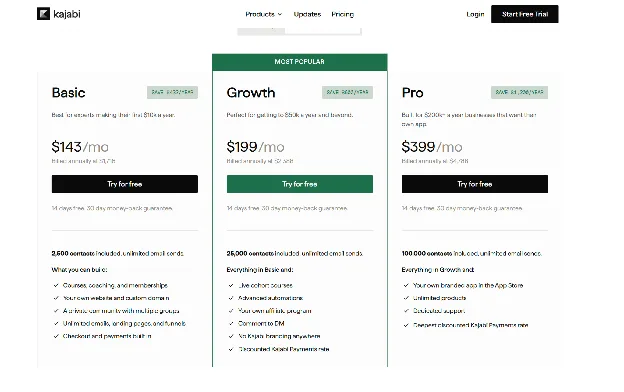
Kajabi wants to be your whole business, so email, website, courses, community and checkout all live in one account. Basic costs $143 a month on annual billing or $179 per month to month. Kajabi doesn't take a cut of your sales, but you'll still pay card processing, which starts at 2.9% plus 30 cents on Basic.
It could work for creators who are already earning and want to replace three or four separate tools, though the community is one product among several rather than the center of the account. Check the limits first, too. Basic allows 5 products and 2,500 contacts, and your own app in the App Store is a $199 a month add-on, or included on Pro at $399 a month. Skip Kajabi Payments for another processor and Kajabi adds a 2% fee on Basic, too.
3. Podia
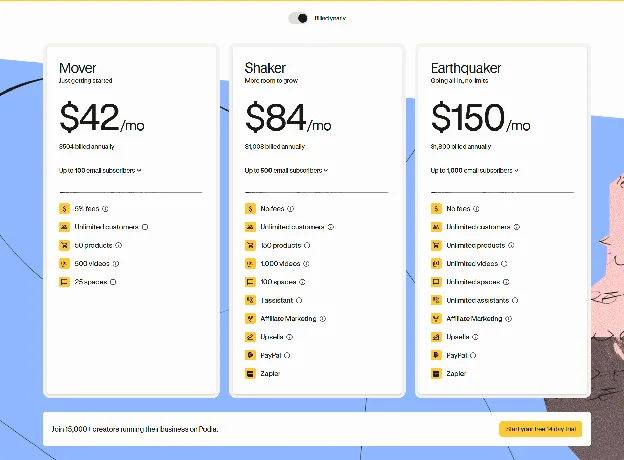
Podia is a low-cost way to get a website, courses and email in one account. Mover costs $42 a month on annual billing and Shaker costs $84. The real difference is the fee: Mover takes 5% of each sale, while Shaker and Earthquaker take nothing.
That means Mover only makes sense while sales are small. At $1,000 a month, Shaker already works out cheaper once you count the fee. Podia might suit creators who sell a mix of courses and downloads, but there's no mobile app, so members can only reach the community in a browser. Keep an eye on email, too. Mover includes just 100 subscribers and Shaker includes 500, so a big list means paying extra.
4. Circle
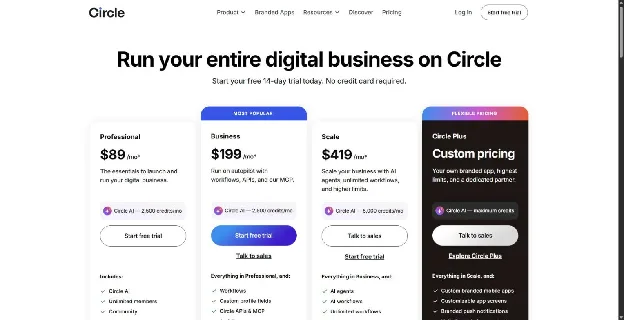
Circle is a community-centric product, with courses and events built around the conversation rather than the other way round. Professional costs $89 a month billed yearly with a 2% fee on sales, while Business costs $199 with a 1% fee. Both fees come on top of Stripe's processing.
It could work for creators whose members join to talk to each other. The fee never goes away on the published plans, though, so high earners keep paying it for as long as they stay, and your own app in the App Store needs Circle Plus, which is priced on request.
5. Mighty Networks
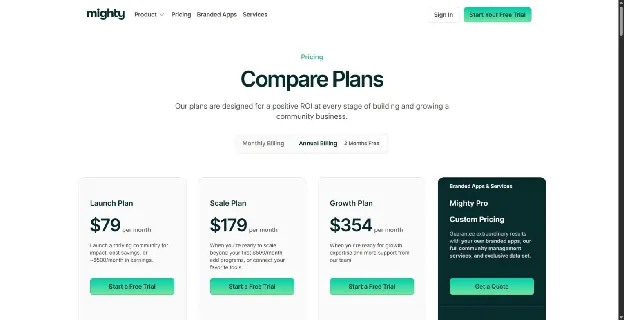
Mighty Networks mixes community, courses and events in one place. Launch costs $79 a month on annual billing with a 2% fee, and Scale costs $179 with a 1% fee. There's no plan where the fee drops to zero.
It could work for creators running a group with a lot going on, like live sessions, a feed and a course or two. Want your own app in the App Store and Google Play? That takes Mighty Pro, which is priced on request.
6. MemberPress
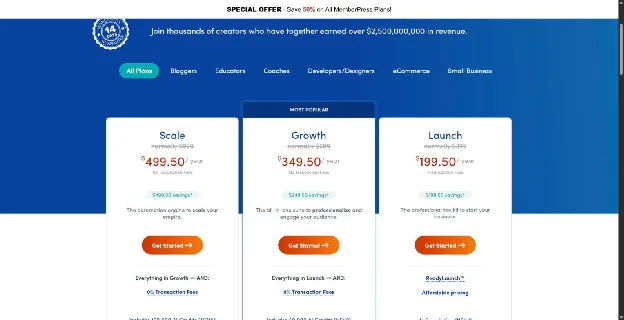
MemberPress turns a WordPress site into a membership site. The Launch plan lists at $399 a year with 50% off the first year, and it takes 4.9% of each payment. Growth and Scale take no fee at all. Growth costs $699 a year at full price, with the same first-year discount.
If you already run WordPress and would rather not hand control to a platform, it's worth a look. The flip side is that hosting, updates and security become your job too, and community tools only come with Growth and Scale. One thing to watch when you buy: renewals are billed at full price, so your bill doubles in year two.
7. Ghost
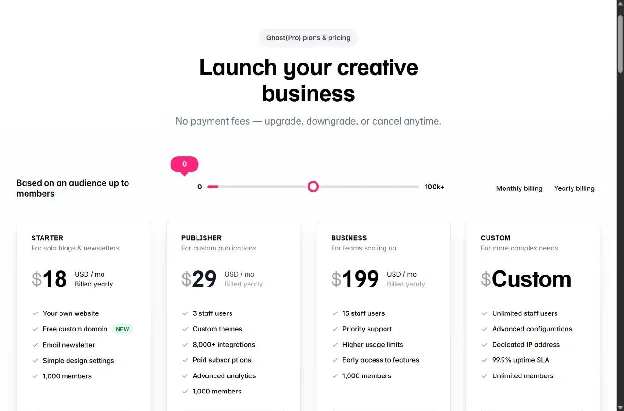
Ghost is a publishing platform with paid memberships built in. It takes 0% of your member payments, so Stripe is the only one taking a cut.
It might work for writers selling a paid newsletter, but watch the plan names. Starter doesn't allow paid members, so Publisher, at $29 a month on annual billing, is the real starting price. That price also goes up as your list grows. You won't find built-in course tools, though, and members can only talk in the comments, so there's no community to speak of. Anyone selling a group program or a paid community will need a second tool.
8. Memberful
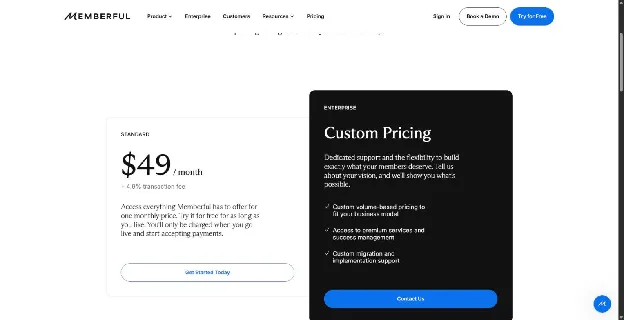
Memberful adds paid memberships to a site you already run. There's just one plan, Standard, at $49 a month plus 4.9% of every sale.
It might work for podcasters and newsletter writers who don't want an integrated community, because Memberful doesn't have one. Members talk in Discord, Discourse or Circle, which you connect and run separately. Private podcast feeds are the main draw. The 4.9% fee is the other catch. At $20,000 a month, that fee alone comes to $980.
9. MemberSpace
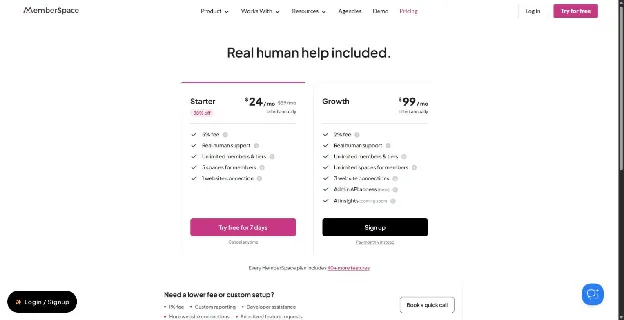
MemberSpace bolts onto Squarespace, Wix, Webflow and other sites. Starter costs $39 a month on annual billing and takes 5% of each sale. (It was on sale for $24 when we checked.) Growth costs $99 and takes 2%.
It could work for creators who love their current site and just want to add a members area. The community side is a forum, and members use your site rather than an app. Remember that you'll still pay for that site, and Starter limits you to 5 member spaces and one website. Once you pass $2,000 a month in sales, Growth's lower fee makes it the cheaper plan.
10. Squarespace and Wix
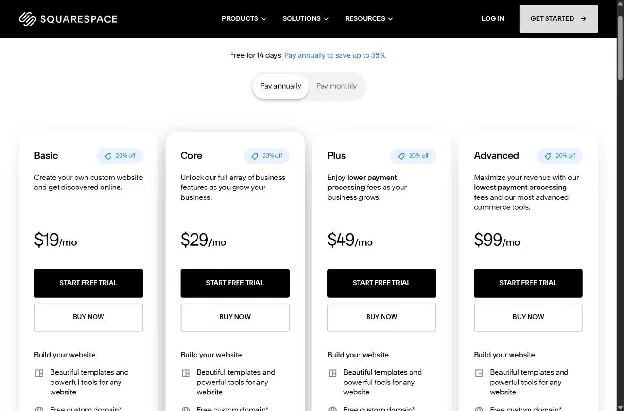
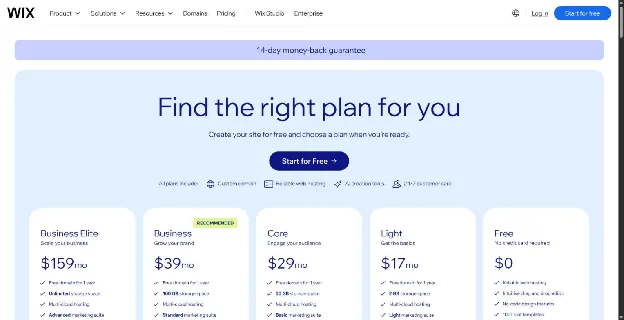
Got a site on Squarespace or Wix already? You may not need another tool at all, since both let you lock pages behind a paywall. On both, though, your plan decides the fee. On Squarespace, Core costs $29 a month on annual billing and takes 5% of your membership sales. Plus costs $49 and takes 1%, and Advanced costs $99 and takes nothing. So once you sell more than about $500 a month, Plus is the better deal. Past $5,000, Advanced wins. Wix works the same way. Its Core plan is also $29 a month, but it takes 4% of each membership payment. Business ($39) cuts that to 2%, and Business Elite ($159) cuts it to zero.
These might work for creators with simple needs: a few locked pages, a monthly fee and nothing more. If you're after a busy community, drip courses or a member app, you'll outgrow them quickly.
What it costs at $1,000, $5,000 and $20,000 a month in member payments
The sticker price is only part of the bill, so here's the full monthly cost on each platform with fees included.
To keep things fair, we used the same setup for every platform:
- A $50 monthly membership, which works out to 20 payments at $1,000, 100 at $5,000 and 400 at $20,000.
- Annual billing, shown as a monthly cost.
- US card processing at 2.9% plus 30 cents per payment.
- The cheapest plan that fits at each level.
Card processing alone comes to $35 at $1,000, $175 at $5,000 and $700 at $20,000, and every platform below pays at least that.
Here's one worked out in full, using Podia Shaker at $5,000 a month:
- Plan: $84
- Card processing: $5,000 x 2.9% = $145
- Per-payment charge: 100 x $0.30 = $30
- Podia fee: $0
- Total: $84 + $145 + $30 = $259
| Platform (plan used) | $1,000/mo | $5,000/mo | $20,000/mo |
|---|---|---|---|
| Kajabi (Basic) | $178 | $318 | $843 |
| Podia (Shaker) | $119 | $259 | $784 |
| Circle (Professional, Business at $20k) | $144 | $364 | $1,099 |
| Mighty Networks (Launch, Scale at $20k) | $134 | $354 | $1,079 |
| MemberPress (Growth, hosting not included) | $93 | $233 | $758 |
| Ghost (Publisher) | $64 | $204 | $729 |
| Memberful (Standard) | $133 | $469 | $1,729 |
| MemberSpace (Starter, Growth from $5k, site not included) | $124 | $374 | $1,199 |
| Squarespace (Plus, Advanced at $20k) | $94 | $274 | $799 |
| Wix (Business, Business Elite at $20k) | $94 | $314 | $859 |
Look closely at those totals and a few patterns show up.
First, the cheapest rows hide extra costs. MemberPress needs paid hosting, Ghost's price climbs as your list grows, and MemberSpace needs a website to sit on.
Second, percentage fees sting most at the top end. At $20,000 a month, Memberful's 4.9% fee comes to $980 on its own. Squarespace Core's 5% would cost you $1,000, which is why we moved Squarespace to Advanced, with no fee, in that column.
Third, plans have switch points, and it's worth knowing where they are. On Circle, Business only starts to beat Professional once you're past $11,000 a month. Mighty's Scale plan pulls ahead of Launch at around $10,000. So before you sign up, see which side of the line your sales fall on.
How to build a membership site in six steps
1. Pick your offer. Start by getting clear on what people are actually paying for. A fitness coach might post two new workouts a month. A marketing consultant might host a Q&A call every Tuesday, or simply give members a private space to swap notes. Whatever you land on, picture month six. If you can't think of a good reason someone would still be paying by then, the offer needs more work.
2. Set your price. A lot of creators give people two ways to pay, monthly or yearly, and knock a little off the yearly price as a thank-you for sticking around. Pricing is the bit people tend to agonize over. If that's you, try letting in a small founding group at a lower rate first. You can always charge more to the people who come later.
3. Find the right platform. Use the three paths above to narrow things down. After that, go to the cost table and look at the column for the sales you expect a year from now, because the cheapest option today isn't always the cheapest once you grow.
4. Make your first content. Don't open the doors to an empty room. Aim to have about a month's worth of material ready so new members have something to dig into straight away, and sketch out what you plan to add week by week after launch.
5. Launch to your list. Your first members are most likely to be people who already follow your work, so start there. Email your list, talk about the launch wherever your audience hangs out online and give them a real deadline. Without one, plenty of people mean to join and never get around to it.
6. Keep members around. People cancel when they stop seeing a reason to pay, so give them one every month. Pick a posting rhythm you know you can manage (a new lesson every Monday, say) and don't skip it. If someone leaves anyway, email them and ask what was missing. Not everyone will write back, but the ones who do tend to be blunt, and that's useful.
Frequently asked questions
How to create a membership website?
Start with the offer. If you can't explain what someone gets each month that's worth paying for, no platform is going to fix that for you. Then pick your builder. You've got three main choices: a hosted platform, a WordPress plugin or a paywall added to your current site. From there, get your first month of content ready, decide on a price and tell your email list. Our six steps on how to create a membership site cover each part in more detail.
Can you give me some examples of membership websites?
Sure, here are four real ones. Yoga With Adriene runs Find What Feels Good, a members-only library of yoga, mindfulness and fitness classes, with a community built in. Futur Pro, run by business coach Chris Do, gives business owners live calls twice a month, a big library of lessons and a private group. Stratechery, from writer Ben Thompson, gives its weekly articles away. Paying members also get three Daily Updates a week. Platformer, from tech journalist Casey Newton, works in a similar way: paying members get at least one extra post a week and a seat in Sidechannel, a Discord shared with other independent journalists and their subscribers. Each site offers something different, but in every case, members pay on a schedule to keep their access.
How do I build a subscription website?
Pretty much the same way you'd build a membership site. You'll need a way to take recurring payments and a way to keep content locked to paying members. Every platform in this guide handles both. Once you've picked one, you connect a payment account (Stripe is a common option), set your monthly price and you're ready to take subscribers.
How much does a membership website cost?
That depends on which tool you pick and how much you sell. At $1,000 a month in sales, the platforms we looked at cost roughly $64 to $178 a month once fees are included. At $20,000 a month, that range climbs to about $729 to $1,729.
Do membership platforms take a cut of my sales?
Some do and some don't. Kajabi and Ghost don't take a cut at all. Circle, Mighty Networks, Memberful and MemberSpace take one on every plan we priced. Podia and MemberPress only charge it on their cheapest plans. On Squarespace and Wix, the fee shrinks as you move up, from 7% on Squarespace Basic and 4% on Wix Core down to zero on their top plans. Fees run from 0% to 7%, and you'll pay card processing on top almost everywhere.
Can I add a membership to my Wix or Squarespace site?
Yes. Both come with member areas built in, and if you need more than they offer, you can add a tool like MemberSpace on top. When you work out the cost, remember to include your website plan as well as any membership fees.
Is WordPress good for a membership site?
It can be, if you don't mind looking after the site yourself. A plugin like MemberPress gives you full control, and its higher plans don't take a platform fee. The trade-off is that hosting, updates and security are all on you.
Sources
Every price, fee and limit on this page and where it came from. Last checked .
| Claim | Source |
|---|---|
| Kajabi plans, limits, Kajabi Payments rates, third-party processor fee | kajabi.com/pricing |
| Podia annual prices, 5% Mover fee, email caps, plan limits, refund terms, no mobile app | podia.com/pricing |
| Memberful Standard $49 + 4.9%, single published plan, custom app via API | memberful.com/pricing |
| MemberSpace Starter and Growth prices, fees, limits, members use your site (no separate app) | memberspace.com/pricing |
| Stripe 2.9% + 30 cents domestic cards | stripe.com/pricing?dsktp=1 |
| Ghost 0% transaction fee | ghost.org/help/are-there-really-no-transaction-fees |
| Circle plans, 2% / 1% fees, courses on all plans, branded app on Circle Plus only | circle.so/pricing |
| Mighty Networks Launch and Scale prices and fees, branded app on Mighty Pro only | mightynetworks.com/pricing |
| MemberPress Launch and Growth regular and first-year prices, 4.9% Launch fee, renewal terms, courses on all plans, community tools on Growth and Scale | memberpress.com/pricing |
| Ghost Publisher price, no paid members on Starter, no course tools listed | ghost.org/pricing |
| Squarespace US plan prices, digital/membership fees by plan, courses on all plans | squarespace.com/pricing |
| Wix plan prices, Pricing Plans fee (4% Core, 2% Business, 0% Business Elite), Online Programs and Groups from Core, Spaces member app | wix.com/plans |
| Memberful has no native community: integrates with Discord, Discourse and Circle, plus integrated comments | memberful.com/features |
| Podia has no mobile app | help.podia.com/en/articles/11371052-understanding-the-member-experience |
| Kajabi branded app included on Pro, $199/mo add-on on Basic and Growth | help.kajabi.com/en/articles/12696396-kajabi-branded-app-faqs |